Showing posts with label Photoshop. Show all posts

December 29, 2008

Playing with Potatoes.

Mama Marshamallow made fried potatoes and bacon coupled with fried eggs for brunch. The potatoes were so cute and wrinkly while they were lying out to dry that I borrowed a few and took pictures of them. I also made a few textures of my own: scratched wood and swirls of plaster. I am going to be on the look out now for intriguing textures and patterns. Perhaps you will too :) 


vintage potato., originally uploaded by kaliji.
texture by Andrea Rusky


hot potato., originally uploaded by kaliji.
texture by moi: the ceiling of my boudoir


abstract potato., originally uploaded by kaliji.
texture by moi

creepy potato., originally uploaded by kaliji.
texture by Andrea Rusky

What is TTV anyway?

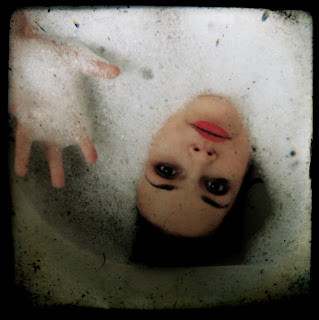
If you're a flickr afficionado you've no doubt noticed an onslaught of artsy photos with intriguing borders cropping up all over the place. In case I am not the last person to figure out what TTV is all about I thought I would do a post about it. TTV is an acronym for Through The Viewfinder; a TTV shot is constructed by taking a picture with your digital camera through the viewfinder of any other camera. Sounds easy enough, however the real fancy TTV's require a digital SLR with a macro lens and a dual reflex camera. While I have access to a digital SLR, I do not own a macro lens and lack the requisite patience to build an apparatus which will allow the cameras to cohabitate. However, if that is up your alley check out Russ Morris' tutorial. Luckily, faux TTV's seem to be in vogue and they are ridiculously easy to achieve in Photoshop, here's how:

Grab some free TTV borders. Try Noise and Dust Through the Viewfinder and Quality Textures and TTVs. And remember who made it so you can credit them later.
Open up a photograph and a few of the textures you downloaded in Photoshop.
Choose one texture to begin with. Select all of it (Ctl A), Copy it (Ctl C), and Paste it (Ctl V) on your photo. It will look wonky.
In the Layers Palette click on the layer you just pasted and in the dropdown menu above it change the Layer Property from Normal to Multiply. Now it looks better.
Now Transform (Ctl T) the texture to fit your photo. Hold down the shift key as you
make it bigger or smaller to keep its proportions intact. Then press the Enter key.
Flatten the image (Layers>Flatten Image) and Crop away any excess.
Try on different TTV textures to see what works best with your image.

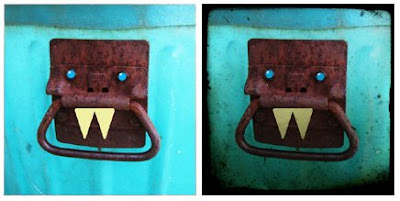
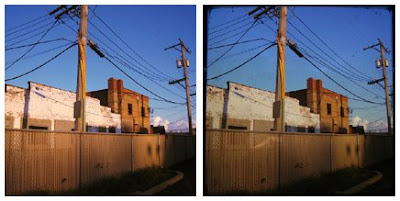
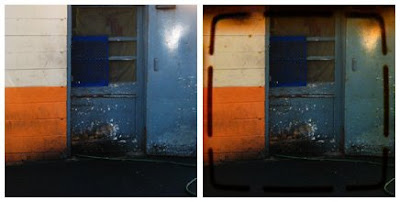
Before and After

This last one is an example of how the tutorial can be used with any texture.
Texture by Andrea Rusky
TTV textures by Nesster

I'm going to pretend to organize my emphemera when really scouring for my own textures to use.
Happy playing and downloading! Wouldn't these be cool to print off and use in your journal! :)

I can't wait to use this one.
xo Lara

February 2, 2008

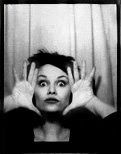
photocopiers are almost as cool as photobooths.

If like me, you envy the elegant and funky photo strips in people's journals or amalgamated on Photobooth Friday, I present thee with a cheaper, bigger, and more dangerous alternative: photocopiers! Grab a friend (or not), a pocketful of dimes, and head to your local library for oodles of fun encapsulated in a sheet of 11x17. Why is it dangerous? Because snooty library gestapo and office snitches lurk behind every corner, so a lookout is a worthwhile tool to avoid being reprimanded for the misuse of facsimile equipment.
I challenge you to make some photocopy self portraits (or group shots) and use them in your journal or for decorating your walls :)

....
Things that made me happy today (from 43things):
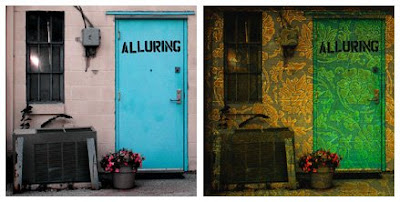
Finally installing Photoshop on my laptop and playing with it (i.e. the images above and the one below)
Watching indie flicks with my madre
Blogging at my favorite local pizza joint
Thinking about her
Writing down my 2008 list
-♥-

This year I want to (in no particular order):

Fall in love
Get a job
Take risks
Go on a roadtrip without a predetermined destination
Visit a spiritual vortex (Burlington, WI or Sedona, AZ)
Overcome my irrational fear of my sewing machine
Watch the sunrise on a beach with my lady
Skinny dip
Camp
Conserve more
Go to a French or farmer's market at least once a month
Perfect my Russian and British accents and add French to the repertoire
Create meaningful friendships and see my friends more often
Be less of a hermit
More bufu morning dates
Explore Chicago
Attend at least five concerts
Throw three theme parties and a dinner party
Visit the public library once in awhile (return stuff from two summers ago)
Art museums!
Learn sign language
Dedicate more time to learning Spanish
Make a mondo blanket fort
In summer dance barefoot outside in the morning once a week
Ride my bike
Get my driver's license (finally!)
Convert my room into an organized, inspirational space
Complete three assignments from Learning to Love You More
Send out RAOK's, postcards, mailart, and letters again
Finish a new journal every two months
Keep blogging
Make a shrine
Show my love more
Make some money
Live a more creative life
Be less fearful
Figure out what I want to do/study
....
-♥-